
The Import (IDX) and Export (IDX) commands allow you to track the design changes, which are made by multiple design teams, compared to a baseline design. In the Import (IDX): Compare Diff dialog, you can either accept or reject the changes in the incremental file. Your decision is then delivered to the relevant team using the response file created in this dialog. These files are described below.
| Item | Description |
|---|---|
| Baseline file | This IDX file is the base design that links the information passed between electrical design and mechanical design teams. Incremental changes that you accept in the Import (IDX): Compare Diff dialog will reset the baseline design. |
| Incremental file | This IDX file is used to deliver electrical or mechanical design changes to the relevant team. The receiving team detects the differences between this file and the baseline design, and seeks advice from the designer over whether to add the changes to the design.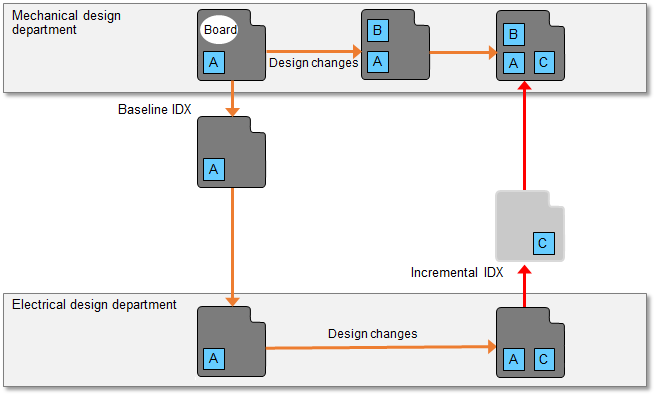 Note Only specific non-electrical items that are added to the electrical system can be moved to the mechanical system. |
| Response file | This IDX file is is used to communicate the decision to either accept or reject the changes that are contained in the incremental IDX file. The receiving team can then update the design accordingly. |
The following procedure describes how to import an Incremental IDX File.
- Click Design
> Import >
 IDX on the ribbon in eCADSTAR PCB Editor. The Import (IDX) dialog is displayed.
 - In the Import (IDX) dialog, specify the location of the IDX file you want to import.
- If necessary, edit the IDX parameters. See: Import (IDX): Edit Parameters Dialog
- Click Execute in the Import (IDX) dialog. The specified IDX file is loaded.
- If an incremental IDX file is detected, then a confirmation dialog is displayed.
- Click Yes in the displayed dialog to load the file.
- An eCADSTAR dialog is displayed that lists any problems encountered loaded the file.
- Click Close in the eCADSTAR dialog. The Import (IDX): Compare Diff dialog is displayed. The baseline design data and the data from the incremental IDX file are displayed in the Compare diff. table.
- In the Import (IDX): Compare Diff dialog, Response file box, specify the path to the IDX response file that is exported when you click Execute.
- For the differential items in each row of the Compare diff. table, specify whether to accept or reject the relevant change. Your decision is recorded in the IDX response file.
- Click Execute. The IDX response file is created based on your decisions, and the dialog is closed.
Note
- This function is compatible with EDMD 2.0 and 3.0.
- Incremental IDX files can only be processed that are output by the following mechanical CAD packages.
- Creo View ECAD Validate 8.0 (PTC)
- NX 1980 (Siemens PLM)
